
Threads
InstagramSocial
4.039.48K Reviews
- Version
- 454.0.0.54.79
- Installs
- 500.00M
- Age Rating
- Teen
Screenshots

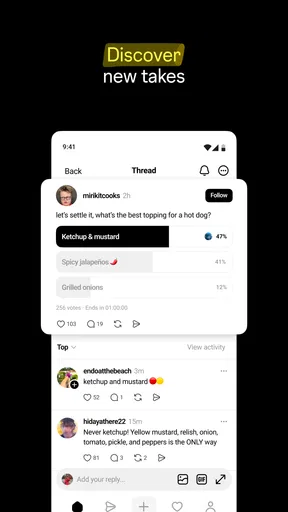
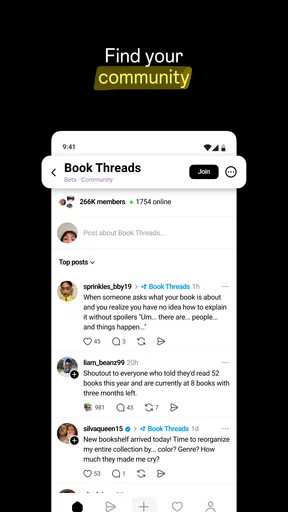
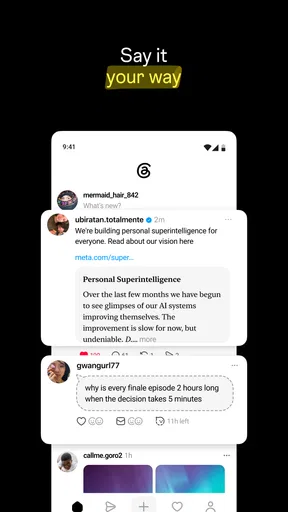

Our Review of Threads
 Analysis by Appyee
I judge social apps by what happens when the connection is patchy, not just by how polished they look on a good signal. Threads is built around a live social feed, so browsing, posting, and keeping up with replies all depend on being connected. That makes it most satisfying when I have a steady connection and a few minutes to follow a conversation, rather than when I’m trying to use it as a private notebook or a substitute for messaging that works regardless of network conditions.
When the feed needs a connection
Threads is a social app from Instagram, and its current identity is quite different from the close-friends messaging tool described in older discussions of the name. The version I’m reviewing is built for public and conversational posts: you can read what people are saying, respond, and add your own thoughts. That makes the network central to the experience. A post is useful because other people can see it and answer, and replies only feel immediate when the feed can load properly.
In practice, I’d open it when I want to check a topic, see what people I follow are discussing, or add a quick comment to a conversation that is already moving. It is less suited to composing a long, carefully structured piece while switching between weak connections. If a feed stalls, I treat that as a cue to wait for a better signal instead of repeatedly tapping controls and risking a duplicated action or a post that never finishes.
That live quality is also the main trade-off. A busy conversation can reward checking in at the right moment, but it can move on while I’m away. Threads works better as a place to participate in ongoing social chatter than as a permanent archive that I expect to revisit in a tidy, predictable order.
On a phone, in the gaps of the day
The mobile format makes the app easy to check in short bursts: while waiting for someone, during a break, or after seeing a topic mentioned elsewhere. One realistic routine is to open the feed over breakfast, skim a few posts, save a thought for later, and come back when there is time to write a reply. That is a more comfortable rhythm than trying to follow every conversation as it happens.
Threads is a strong fit if you already enjoy social posting and want a text-forward place to react, joke, explain, or ask a question. It can also suit creators and small communities that want to keep a discussion going between visual posts on Instagram. The key is to approach it as another public-facing social space, not as an automatically private room for close friends. Before posting, I’d check the audience and the wording, especially if a thought is intended for a small group rather than a broad readership.
If you mostly want one-to-one conversation, a direct messaging app is usually the simpler choice. If you want visual discovery, Instagram’s photo and video feed may feel more natural. And if your priority is reading a carefully organized stream of updates from selected sources, a dedicated feed reader can be calmer than a social timeline. Threads is at its best when the back-and-forth itself is part of the point.
What to do when something does not load
Connection trouble can make social apps feel less reliable than they are. When posts or replies do not appear, I first check whether other apps can reach the internet, then give the feed a moment before trying again. That small pause is useful: repeatedly refreshing can waste time and makes it harder to tell whether a post has actually gone through. If I have something important to say, I draft it in a separate notes app first and paste it in once the connection is stable.
That workflow is particularly helpful for a longer reply or a thread of related thoughts. I can edit for clarity before I publish, then send it when I’m ready, rather than composing under pressure while the screen is still loading. For a casual reaction, writing directly in the app is convenient; for anything I would be annoyed to lose, preparing the text elsewhere is the safer habit.
There is also a social side to recovery. A delayed reply is not necessarily a sign that someone ignored you; the feed may simply not have updated yet. I avoid treating an empty or stale timeline as a complete picture of what is happening. A quick check later is often more useful than trying to force the app to refresh in a poor-signal area.
Using it without letting it eat the day
Because the feed invites ongoing browsing, it can turn a quick check into a longer session. I find it helps to open Threads with a purpose: catch up on a conversation, respond to a friend, or share one specific thought. Once I’ve done that, I can leave rather than scrolling simply because new posts keep appearing. This is not a special feature; it is a practical boundary that makes a fast-moving social feed easier to live with.
For readers who are mindful of mobile data, the most useful choice is to reserve heavier browsing for a dependable connection and keep quick checks brief when using a limited plan. Text conversations may feel lighter than a stream centered on photos and video, but media can still be part of social feeds, so I would not assume every session uses negligible data. Avoid leaving the app open as background entertainment if you are trying to conserve both data and attention.
Privacy deserves the same deliberate approach. A conversational tone can make a public post feel like a message to a friend, even when its audience is much wider. I pause before sharing personal details, location clues, or anything that would be awkward outside the immediate context. The app’s social convenience does not remove the need to decide what I actually want other people to see.
Who will enjoy it, and who may not
I’d recommend Threads to people who like short written updates, public replies, and following discussions through their social circles. It is especially useful when you want to add context or commentary that would feel cramped in a photo caption. Readers who prefer a quieter, chronological place to keep up with only a few people may find the activity and discovery side less appealing, while people who do not want a public social presence may be better served by private messaging.
Compared with X-style microblogging services, the appeal here is its connection to Instagram’s social world and the ease of moving between visual culture and text conversation. Compared with a group chat, the audience can be broader and participation less intimate. Those are not interchangeable roles: a group chat is better for planning dinner or sharing sensitive updates, while Threads makes more sense when you want a thought to invite replies from a wider circle.
A useful habit is to separate the destination from the content. If the message is meant for a handful of people, send it through a private channel; if it is an opinion, question, or public reaction that can benefit from a wider discussion, Threads is the more natural fit. That choice prevents the common mismatch of posting something personal in a space designed for broader social interaction.
Threads is free to download, though it includes optional in-app purchases priced from $0.99 to $131.99 per item. It has a Teen content rating, so families should consider that context when deciding whether it is suitable for younger users. Its average rating is 4.0 from around 2.6 million ratings, and it has more than 500 million installs. Those figures suggest a widely used service, but they do not guarantee that its style or pace will suit every reader.
How it fits into my social routine
I would not make Threads my only social app. I’d use it for conversation and quick commentary, Instagram when the visual post is the main event, and a private messenger when a discussion should stay between specific people. That division gives each service a clearer purpose and reduces the temptation to copy the same update everywhere. It also makes it easier to decide where to look when I want a particular kind of interaction.
For someone deciding whether to try it, the most useful question is not whether the app is popular but whether you enjoy public, reply-driven conversation. If you like sharing a thought and seeing how other people build on it, the format can feel lively. If you mainly want a quiet feed, guaranteed delivery in weak-signal situations, or a private place for personal exchanges, a different tool is likely to be a better match.
As someone who's always on the lookout for the next big thing in social media, I couldn’t resist diving into the world of Threads—the app that’s making waves as the perfect companion to Instagram. So, is it really as game-changing as everyone claims? Let’s find out!
What Exactly is Threads?
In a nutshell, Threads is a standalone messaging app designed for sharing quick updates with your close circle of friends on Instagram. Think of it as your personal space to connect with your inner circle without the noise of a broader social media audience. If you’re someone who values privacy and intimacy in communication, this app might just be your new best friend.
Getting Started
Setting up Threads is a breeze. Once you download the app, it seamlessly links with your Instagram account. It’s like a warm handshake between two old friends. You’ll find your close friends list already waiting for you, and you can customize it with just a few taps. The app’s interface is clean and intuitive, making it simple to navigate even for those who aren’t the most tech-savvy.
Features That Stand Out
One of the coolest features is the auto-status. Yes, you heard that right! Threads can automatically update your status based on your location, movement, and even your phone’s battery level. It’s like having an invisible assistant giving your friends a heads-up about what you’re up to. Of course, you can switch this off if you’re not comfortable with sharing that much info.
Another great perk is the camera-first design. With a quick swipe, you’re ready to snap and share a photo or video with your friends. This instant sharing feature is perfect for capturing those spontaneous moments without any hassle.
Why It’s Worth Downloading
If you’re someone who cherishes meaningful interactions, Threads is a breath of fresh air. It strips away the clutter of traditional social media platforms, allowing for genuine connections. Plus, the focus on privacy is a huge relief for anyone tired of broadcasting their life to the entire world.
But don’t just take my word for it. The app is constantly evolving, with new features being added to enhance the user experience. It’s exciting to see where the developers will take it next.
Final Thoughts
So, is Threads the ultimate game-changer in the messaging world? It might not completely replace your other social media apps, but it’s definitely a refreshing addition. Whether you’re whispering secrets or sharing a laugh, it’s a cozy corner of the digital realm where you can truly be yourself. Give it a try and see how it fits into your social media routine—you might just find it’s the perfect complement to your online life!
Privacy and Permissions
See what permissions an app requests and how it handles your data.
- Identity
- find accounts on the device, read your own contact card
- Contacts
- find accounts on the device, read your contacts
- Location
- approximate location (network-based), precise location (GPS and network-based)
- Phone
- directly call phone numbers, read phone status and identity
- Photos/Media/Files
- read the contents of your USB storage, modify or delete the contents of your USB storage
- Storage
- read the contents of your USB storage, modify or delete the contents of your USB storage
- Camera
- take pictures and videos
- Microphone
- record audio
- Wi-Fi connection information
- view Wi-Fi connections
- Device ID & call information
- read phone status and identity
- Other
- view network connections, pair with Bluetooth devices, full network access, change your audio settings, run at startup, draw over other apps, use accounts on the device, control vibration, prevent device from sleeping
How Threads Compares
Full ComparisonFacebook suits broad friend-and-family connections, Instagram is strongest for creative photo and video sharing, and Threads fits people who want text-led public discussions with fewer ad breaks.
| App | Developer | Rating | Price |
|---|---|---|---|
 Facebook | Meta Platforms, Inc. | 4.6 | Free |
 Instagram | 4.0 | Free | |
 ThreadsThis App | 4.0 | Free |
Verdict
Strengths of Threads
- Intuitive and clean interface.
- Seamless integration with Instagram.
- Real-time thread updates.
- Strong community engagement.
- Minimal ad interruptions.
Limitations of Threads
- Lacks advanced privacy settings.
- Limited post customization options.
- No desktop version available.
- Notification settings are basic.
- Content moderation needs improvement.
Other Releases by Instagram
View All

Similar Picks in This Category
View All
Meta Platforms, Inc.4.6

Instagram4.0

Likee-Live, Chat & Party Games
Likeme Pte. Ltd.4.4

Facebook Lite
Meta Platforms, Inc.4.5

TikTok - Videos, Shop & LIVE
TikTok Pte. Ltd.4.0

Moj: Free Short Drama & Reels
ShareChat4.1
You May Also Like
View All


Frequently Asked Questions
What is Threads and how does it work?
Threads is a social media application developed by Instagram, designed for sharing photos, videos, and text updates with close friends. It emphasizes close-knit interactions by allowing users to create a list of their closest contacts and share updates exclusively with them. It integrates seamlessly with Instagram, providing a focused space for personal interactions.
Is Threads available for both Android and iOS devices?
Yes, Threads is available for download on both Android and iOS platforms. Users can find it on the Google Play Store for Android devices and the Apple App Store for iOS devices. Ensure your device meets the app’s compatibility requirements for a smooth experience.
What are the privacy features of Threads?
Threads offers strong privacy features by focusing on close friend interactions. Users can customize their status and share it only with selected contacts. The app provides options to control who can see your updates, ensuring that your posts remain private and secure among your chosen circle.
Does Threads integrate with Instagram, and if so, how?
Yes, Threads integrates seamlessly with Instagram. It uses your existing Instagram account to populate your list of close friends. The app allows you to send and receive messages and updates directly to and from your Instagram contacts, enhancing the connectivity between both platforms while maintaining a separate space for more personal interactions.
Are there any costs associated with using Threads?
Threads is a free application available for download. There are no costs associated with downloading or using the app. However, as with other social media platforms, it requires an internet connection, so standard data charges by your carrier may apply when using the app over mobile networks.
